Every month, thousands of passwords are stolen in hacker attacks. In addition, many people still use bad passwords. The most popular is still 123456, followed by password or hello. If the same password is used for various accesses, it becomes dangerous. But there are now alternatives. The top 200 passwords can be found at https://nordpass.com/most-common-passwords-list/.

© Storyblocks, Registered on Andreas Wisler
- Length of at least twelve (12) characters
- Use at least one digit
- contain at least one upper case letter and one lower case letter
- contains at least one special character
- the password must not be in a dictionary, must not be a dialect or slang word of any language, or any such word spelled backwards.
- passwords must not contain any personal data (e.g. date of birth, address, name of family members, etc.)
The data protection commissioner of the canton of Zurich has put a page on the Internet with which you can test the quality of your own password. You can find it at https://www.passwortcheck.ch.
The following examples show how long it takes to crack a password:
- Good : <1 s
- NuLh@z%7 : 15 min
- GoodOldTimes : 16 min
- G00d0ldTime$ : 11 days
- G%%d%ldTime$ : 17 years
- GoodOldTimesComeBack : 3 years
- GoodOldT!mesC0meBack : 305 years
- wUqw9CriS3@NutLh@z%7 : >1 million years
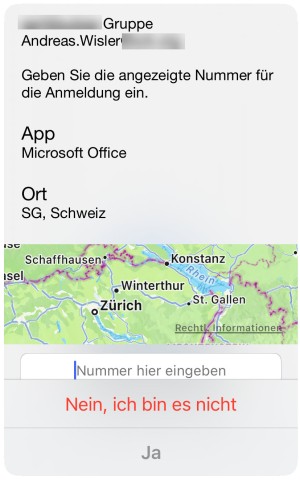
Example of a push message, with number input:
- Never store passwords in the browser for automatic login.
- Use different passwords for each application
- Never write down passwords (unless they are kept secure)
- Passwords used for private purposes must not be used for business purposes (and vice versa)
- Never send passwords by e-mail. It is better to use SMS or an end-to-end encrypted messaging service such as Threema, Signal or WhatsApp.
- Change a password as soon as you suspect it has been compromised.
But there are also alternatives to passwords. The FIDO2 (Fast Identity Online) standard has been available for some time. It uses a hardware key:
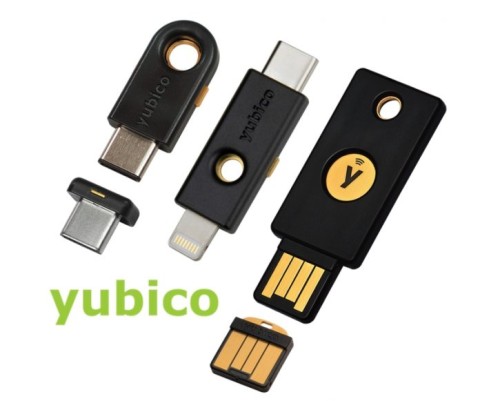
As can be seen in the picture, various interfaces are supported: USB-A, USB-C, Lightning (iPhone / iPad) or NFC (Near Field Communication, radio interface).
FIDO Multi-Device Credentials, or Passkey for short, is also in the starting blocks. It uses the PC or mobile phone instead of the hardware token. Google began converting all logins to this procedure at the beginning of May. Others will surely follow soon. Passkeys use cryptographic keys. A passkey consists of an asymmetric key pair (a public and private key part) that is automatically generated when an account is created. The public key is transferred to the service provider, the private key remains stored in the security chip on the mobile phone or PC. The next time the user logs on to the website, a task encrypted with the public key is sent, which only the private key can solve with a matching answer. This all runs in the background. To prevent misuse by a stranger, this process must be confirmed by facial recognition or fingerprint scan. Some providers are listed at https://passkeys.directory/. More are being added all the time.
A private passkey cannot be guessed or determined by spying on private information. A fake website that can easily recreate a password field today will not work with the cryptographic login. Since the private key is never sent to websites or apps, it cannot be stolen there either. There is, however, a small drop of bitterness. For the "convenience" of users who use multiple devices, the private key is transferred to the Apple, Google and Microsoft cloud. However, with end-to-end encryption during transmission, this is supposed to be secure.
Despite the alternatives, there will still be a long way to go before passwords are no longer used. Only a few providers support the new technologies FIDO2 or Passkeys. Apple is the furthest along, although availability is currently limited to its own devices. Windows and Android users can use Passkeys with Chrome. But even if this technology can be used widely, a challenge remains: Users with many passwords have a lot of work waiting to switch them to Passkeys.